

学习笔记说明
这是一篇Python的学习笔记,关于Python Numpy核心概念,仅做记录
NumPy 核心概念
!uv add numpy==2.5.1
1
import numpy as np
1
NumPy 是 Python 科学计算的基石库,几乎所有数据科学生态(Pandas、PyTorch 等)都建立在 NumPy 之上。
它的底层是使用 C 和 C++ 编写的,因此在处理大规模数据时具有极高的性能。
本节课只讲 NumPy 的核心概念——理解 ndarray 这个数据结构本身,后续课程再讲具体操作。
ndarray
ndarray(N-dimensional array)是 NumPy 的核心数据结构,表示一个多维数组。
它与 Python 原生列表的关键区别:
- 同质化:所有元素必须是相同类型(dtype)
- 连续内存:数据存储在连续内存块中,访问效率高
- 向量化运算:无需循环即可对整个数组执行运算
# 从列表创建 ndarray
arr = np.array([[1, 2, 3], [4, 5, 6]])
print(f"数组: {arr}")
print(f"类型: {type(arr)}")
print(f"形状: {arr.size}, 维度: {arr.ndim}, 数据类型: {arr.dtype}")
1
2
3
4
5
数组: [[1 2 3]
 [4 5 6]]
类型: <class 'numpy.ndarray'>
形状: 6, 维度: 2, 数据类型: int64
1
2
3
4
核心概念
理解 NumPy 的关键在于掌握以下几个概念,它们决定了数组的形状、存储方式和运算规则。
shape(形状)
shape 是一个元组,描述数组在每个维度上的大小。它是理解数组结构的起点。
- 1D 数组:
(n,) - 2D 数组:
(m, n)—— 类似矩阵 - 3D 数组:
(a, m, n)—— 类似多个矩阵堆叠
# 不同维度的数组
a1 = np.array([1, 2, 3, 4])                    # 1D
a2 = np.array([[1, 2], [3, 4], [5, 6]])            # 2D
a3 = np.array([[[1], [2], [3]], [[4], [5], [6]]])    # 3D

# ndim 和 size
print(f"\n维度数 (ndim): {a3.ndim}")
print(f"元素总数 (size): {a3.size}")

# 形状
print(f"1D shape: {a1.shape}")
print(f"2D shape: {a2.shape}")
print(f"3D shape: {a3.shape}")
1
2
3
4
5
6
7
8
9
10
11
12
13
维度数 (ndim): 3
元素总数 (size): 6
1D shape: (4,)
2D shape: (3, 2)
3D shape: (2, 3, 1)
1
2
3
4
5
dtype(数据类型)
dtype 指定数组中每个元素的数据类型。因为 ndarray 是同质的,所以 dtype 统一描述所有元素。
常见 dtype:
float64/float32:浮点数(Embedding 常用 float32 来节省内存)int64/int32/int8:整数bool:布尔值object:Python 对象(尽量避免,会失去向量化优势)
dtype 本质上是把 C 的类型系统暴露给了 Python:
| NumPy dtype | C 类型 | 大小 |
|---|---|---|
int64 |
int64_t |
8 字节 |
int32 |
int32_t |
4 字节 |
float64 |
double |
8 字节 |
float32 |
float |
4 字节 |
而 Python 的 int 是不定长对象,每个对象头就有 28+ 字节开销。ndarray 用 C 的固定类型,才能实现连续存储和向量化计算。
Agent 场景:Embedding 向量通常用
float32,Token ID 用int64,Mask 用bool。
# 不同 dtype 的数组
f_arr = np.array([1.0, 2.0, 3.0], dtype=np.float32)
i_arr = np.array([1, 2, 3], dtype=np.int64)
b_arr = np.array([True, False, True], dtype=np.bool_)

print(f"float32: {f_arr.dtype}, 每元素 {f_arr.itemsize} 字节")
print(f"int64:   {i_arr.dtype}, 每元素 {i_arr.itemsize} 字节")
print(f"bool:    {b_arr.dtype}, 每元素 {b_arr.itemsize} 字节")

# 内存占用的差距
print(f"\n100万 float64: {1_000_000 * 8 / 1024 / 1024:.2f} MB")
print(f"100万 float32: {1_000_000 * 4 / 1024 / 1024:.2f} MB")

# 最佳实践,禁止在同一个数组中混合不同类型的数据
try:
    arr = np.array([1, 2, "a"], dtype=np.int64)
    print(arr.dtype)
except Exception as e:
    print(f"\n指定 dtype 后报错: {e}")
1
2
3
4
5
6
7
8
9
10
11
12
13
14
15
16
17
18
19
float32: float32, 每元素 4 字节
int64:   int64, 每元素 8 字节
bool:    bool, 每元素 1 字节

100万 float64: 7.63 MB
100万 float32: 3.81 MB

指定 dtype 后报错: invalid literal for int() with base 10: 'a'
1
2
3
4
5
6
7
8
strides(步幅)
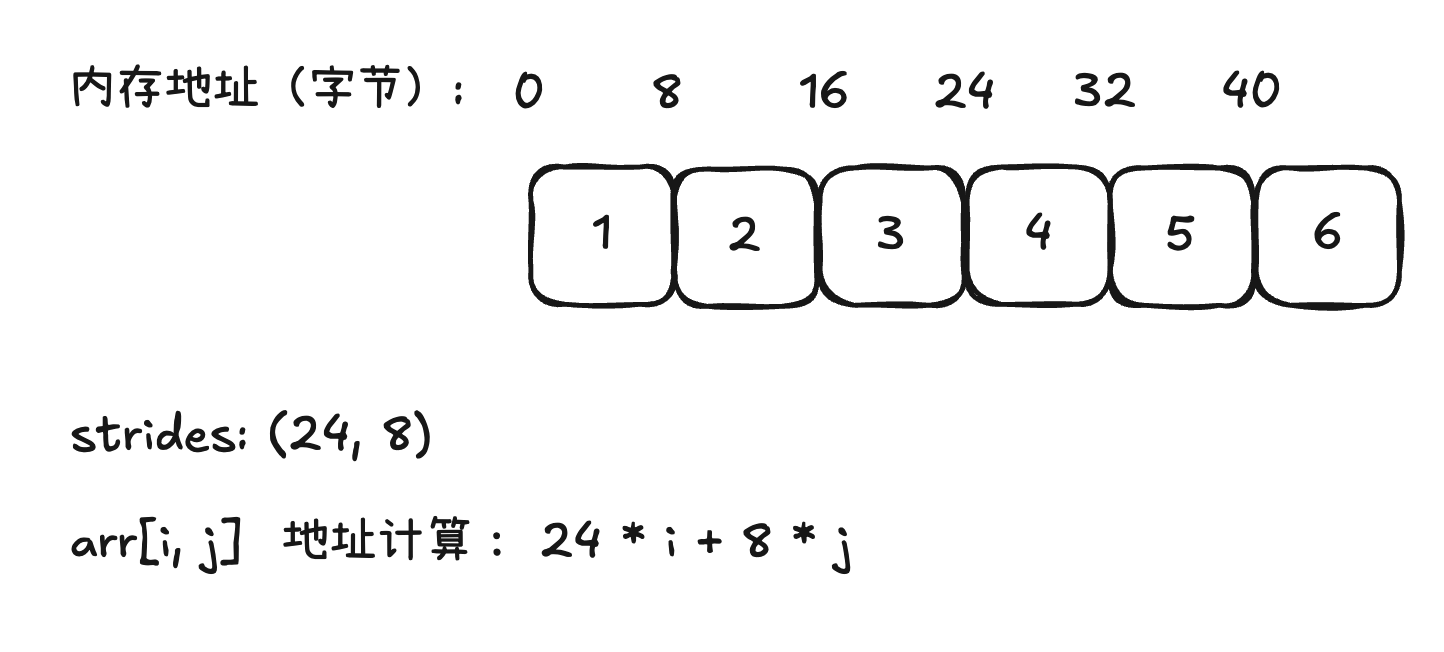
strides 是一个元组,表示在每个维度上前进一个元素需要跳过的字节数。它决定了 NumPy 如何在内存中「行走」。
# 理解 strides
arr = np.array([[1, 2, 3],
                [4, 5, 6]], dtype=np.int64)

print(f"shape:   {arr.shape}")     # (2, 3)
print(f"strides: {arr.strides}")   # (24, 8) = (3*8, 1*8)
print(f"itemsize: {arr.itemsize} 字节")  # int64 = 8

# 行步幅 = 3 * 8 = 24(跳到下一行需跳过 24 字节)
# 列步幅 = 1 * 8 = 8(跳到下一列需跳过 8 字节)
1
2
3
4
5
6
7
8
9
10
shape:   (2, 3)
strides: (24, 8)
itemsize: 8 字节
1
2
3
# strides 的实际影响:转置是零拷贝的
arr = np.array([[1, 2, 3],
                [4, 5, 6]], dtype=np.int64)

t = arr.T
print(f"t: {t}")
print(f"转置 shape:   {t.shape}")     # (3, 2)
print(f"转置 strides: {t.strides}")   # (8, 24)——只是交换了步幅!

t[0, 0] = 99
print(f"修改转置后原数组:\n{arr}")  # 原数组也被修改了
1
2
3
4
5
6
7
8
9
10
11
t: [[1 4]
 [2 5]
 [3 6]]
转置 shape:   (3, 2)
转置 strides: (8, 24)
修改转置后原数组:
[[99  2  3]
 [ 4  5  6]]
1
2
3
4
5
6
7
8
轴(axis)
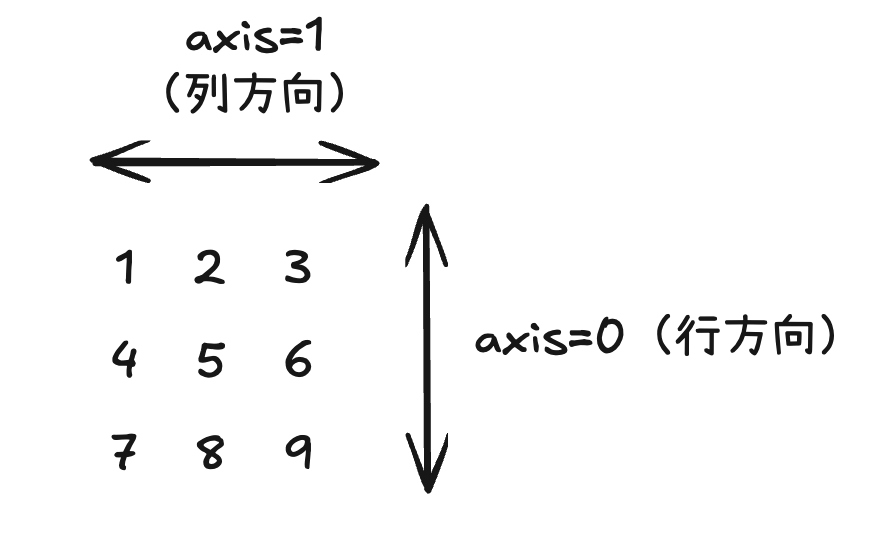
axis 是一个整数,表示数组的维度索引。它用于指定操作沿哪个维度进行。
# axis 的含义
arr = np.array([[1, 2, 3],
                [4, 5, 6]])

print(f"数组:\n{arr}")
print(f"沿 axis=0 求和 (每列): {arr.sum(axis=0)}")  # [5, 7, 9]
print(f"沿 axis=1 求和 (每行): {arr.sum(axis=1)}")  # [6, 15]
1
2
3
4
5
6
7
数组:
[[1 2 3]
 [4 5 6]]
沿 axis=0 求和 (每列): [5 7 9]
沿 axis=1 求和 (每行): [ 6 15]
1
2
3
4
5